
Weekend Release Digest: Qualification Lapse Notices, Round Count Reset, Training Pending and More
A busy weekend in APB360, and all of it is live now. Expired qualifications now reach the officer and their supervisors by email, with the firearm named. A firearm’s round count can start over after a new barrel. Equipment issued before training is finished gets flagged at the moment of issue. Every report exports every row. Here is what changed.
Qualification Lapse Notices: the Officer and the Supervisor, Every Week
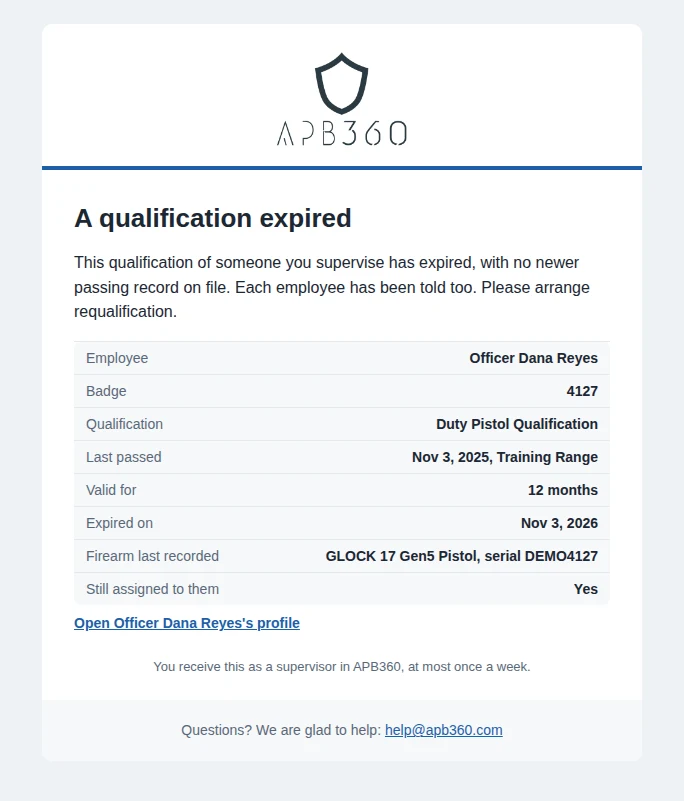
When a firearm qualification expires and there is no newer passing record, APB360 now emails the employee and each of their supervisors. The notice is specific enough to act on without opening a report:
- The qualification: the course, when and where it was last passed, how long it was valid, and the day it expired.
- The firearm: the make, model and serial number of the firearm it was last recorded on, and whether that firearm is still assigned to the officer.
- Both sides told: the officer is asked to schedule requalification, and the supervisor gets a link straight to that officer’s profile. Each knows the other has been told.
- One email a week, at most. Everything that lapsed for a person, or for the people they supervise, arrives together in one weekly digest. Each lapse is sent once.
Supervisors come from your organizational chart, and retired employees are left out. Lapse notices are off until a master level user turns them on in Settings and picks the day of the week they go out.
Round Count Reset on the Firearm Trace Report
APB360 has always counted every round a firearm fires, by ammunition type, from range sessions and training. Now a master or compliance user can start that count over when the armorer replaces a barrel or services the firearm. The new count starts at zero by default, or at any number you enter, so a used barrel can come in with its own count.
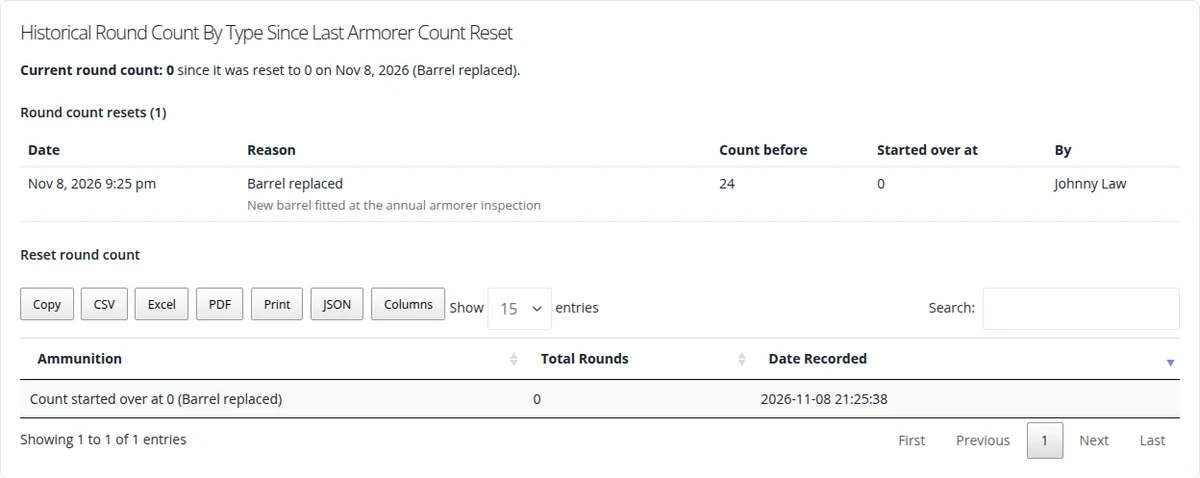
- A reason for every reset: barrel replaced, armorer service, correction, or other with a note. You confirm before anything is saved.
- Nothing is erased. Every earlier round is kept. The report lists each reset with its date, reason, the count before, the new starting count and who made it.
- One count everywhere. The trace report, the employee’s serialized assets and the rounds-by-type reports all count from the newest reset.
- Right at the top. The firearm’s summary on the trace report shows its round count, with a Reset round count link that opens the form.
Training Pending: Know Who Still Owes Training at the Moment of Issue
Training Requirement Sets can now name the asset types they apply to, serialized or not: a patrol rifle, a TASER, a less-lethal launcher. When you assign one of those assets to someone who has not met the set yet, APB360 says exactly what they still owe, the modules and courses of fire, on screen and on the receipt.
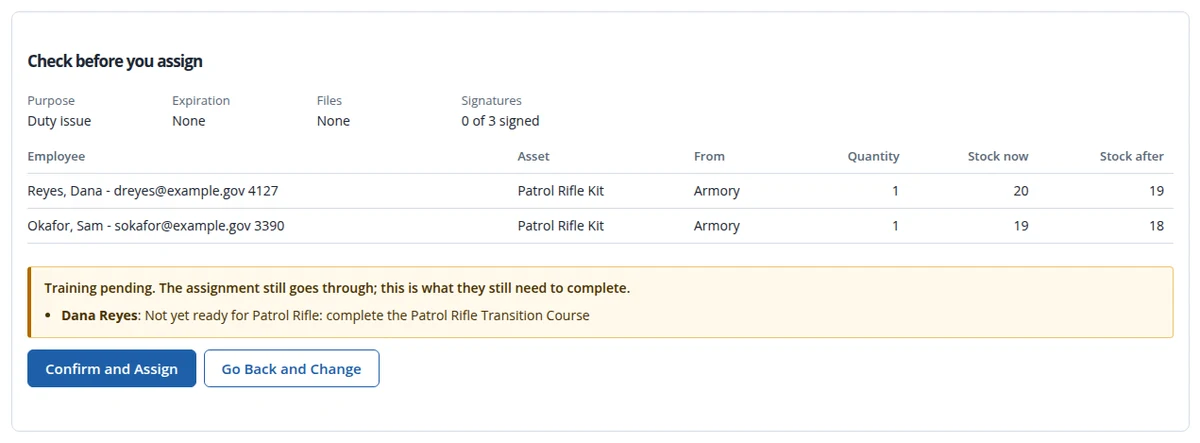
- Flagged, never blocked. The assignment still goes through, because operations come first. The gap is just on the record.
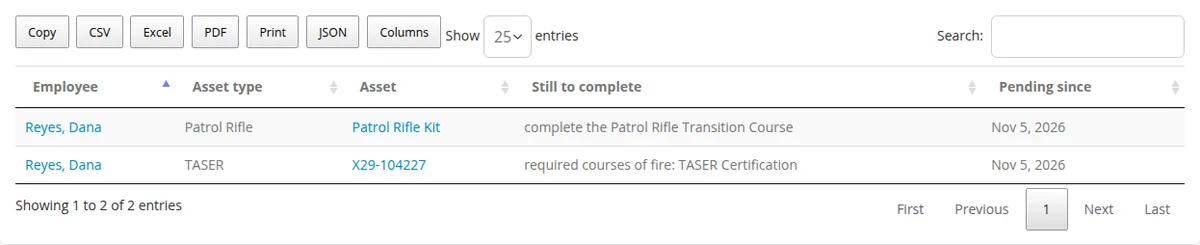
- Followed until it is closed. A Training Pending badge sits beside the qualification badges on the employee’s profile, and the Training Pending report lists every holder until they pass.
BETA Range Session: The Whole Range Day in One Place
Range Session lets one range officer record an entire trip to the range in one place: everyone on the line, every firearm they shoot and every attempt they make. The officer works through five steps (Setup, Shooters, Firearms, Run the line, Review & Finalize) and finalizes the group together. Nothing becomes an official record until it is finalized. Range Session is in BETA and open to every user whose role allows range work, beside the classic Range Check-In. New this weekend:
- Schedule it ahead. Give a session a date and time and, if you like, a maximum number of shooters. Spots are enforced whether people are added one at a time or as a group. Every session appears on the Training Calendar under its own Range Sessions category, with its open spots.
- Training Groups from the roster. Make a new Training Group right from the Shooters step, then add the whole group to the line in one tap next time.
- Award additional credit hours. On Review & Finalize, choose courses or modules and tick the shooters who earned them. The credit is recorded at the same date and time as the range training, with its own instructors of record. It counts toward Training Requirement Sets, training hours and Training Pending.
- Run the line, faster. Every qualification row starts at Pass, and each shooter needs a Pass or Fail before the review. A score below the course minimum is a Fail, and the line says so. On a phone every shooter shows at once, so there’s no paging one card at a time.
- Range Check-In opens Range Session. The Range Check-In and Record New Qualification links on the 360 profile, the expiring and missing qualification lists, the roster and Qualification Analytics now open Range Session. A link from a firearm loads that firearm. The classic form is still one click away on Select Employee for Range Check-In.
Employee Training Requirements Report
The training requirements report has been rebuilt as a full roster: one row per active employee with their requirement sets, their standing (Met, Short and by how much, or no requirements), what is short and any Training Pending asset types. Search across names, badge numbers, email, groups and sets. Filter by set, standing, group or pending type, and the filters stay in the address so a view can be bookmarked or shared. Tap a row for the employee’s full report. It pages on the server, so large agencies load in a moment.
The 360 Employee Profile
- Qualification status per firearm. One panel lists each firearm the employee holds with its status, ownership and a Range Check-In button where a qualification is needed. Firearms already qualified fold away, and unqualified ones are marked in the serialized assets table.
- Non-serialized assets work like serialized ones. Select and return items to a stocking location, or use Move Units to Location and Consume. Each opens a short popup for the quantity, the location and an optional note, with a verify step before anything is saved.
A&D and Custody
- BETA Disposition to Employee starts from the person, not the form. Agencies record the disposition in the A&D record. FFL organizations record custody only and never touch the book. APB360 decides which from your organization type, and shows any Training Pending gap as you go.
- A firearm in an employee’s hands can’t be disposed of by mistake. The BETA disposition forms refuse a serial an employee holds and name the holder. Return it to a stocking location first.
- The BETA A&D forms are open to every user whose role allows A&D work, with no sign-up list.
- A&D Record Correction: the acquisition or disposition reason is your organization’s own label, not a field 27 CFR 478.125 requires. Master and compliance users can now correct it even under Complete Lockdown. The original is still kept and the correction logged.
Every Table Exports Every Row
- Export all, everywhere. Copy, CSV, Excel, PDF, Print and JSON on every data table now export every row that matches your filters and search, not just the page you can see, without redrawing the table. A Columns button picks what to include.
- Employee lists in a predictable order. Every employee picker is sorted by last name, then first name, then badge number.
- Employee files as a real table. The Files section of an employee’s page is now searchable and exportable, and flags expiring documents.
- Asset pages: a unit cost entered before the quantity no longer saves a $0 purchase. Transfers show the units moved. The assign page picks the source location right on its stock table.
- Retired: the old Create Batch and Batch Editor pages are out of the menus. Their pages say so.
Related: one custody model for agencies and FFLs, the BETA A&D forms, and training and qualifications in APB360.
Questions or ideas? Email help@apb360.com or call 251-677-7978.