
Employee Custody, Transformed: One Model for Law Enforcement Agencies and FFLs
Who has what is now answered the same way everywhere in APB360. Law enforcement agencies and FFLs now share one custody model: when an asset is assigned to a person, that person holds it, every report says so, and the 360° employee profile and the Employee Custody Report always agree. The one difference that matters, the A&D book, is decided by your organization’s type, never by anyone’s user group.
The Right Records for Your Organization
- Law enforcement agencies. Assigning a serialized asset to an officer records a disposition to the employee in the A&D book, as it always has, and the officer holds it until it is returned.
- FFLs. Assigning a serialized asset to an employee never writes the A&D book. The asset stays at its stocking location, so your book stays exactly as ATF expects, and every report shows it with the employee who has it.
- Decided by organization type. APB360 reads whether your organization is an agency or an FFL from its account, so a user’s groups can never send a record down the wrong path.
No More Custody Locations for FFL Employees
FFL employees used to need a custody location of their own: a pretend shelf named after each person, which assets were moved onto while they had them. That made the inventory reports and the custody report disagree. Those locations are retired. Assets that were sitting at them went back to the locations they came from, the “Custody location name” field is gone from the employee profile, and new employees no longer get one. If an older form still tries to move an asset to one, it becomes a plain assignment to that employee.
One Report You Can Trust
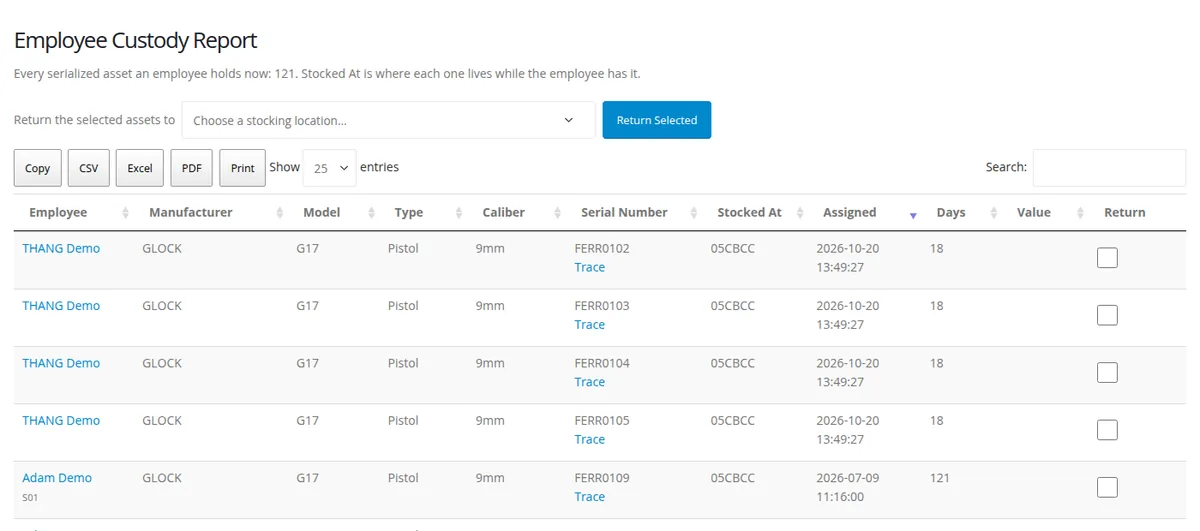
- Every serialized asset an employee holds, with manufacturer, model, type, caliber, serial number, where it is stocked, when it was assigned, how many days it has been out and its value.
- Trace on every serial. One click opens its trace, and the trace’s Current Custodian now names the employee who holds it.
- Return in bulk. Tick the rows, choose a stocking location and press Return Selected. The page confirms which serials went where, and FFL master and compliance users can now return assets too.
- Built for large rosters. The table pages on the server, so it stays fast with thousands of assignments, exports to Copy, CSV, Excel, PDF and Print, and fits a phone.
- History that adds up. The employee’s history now shows FFL assignments too, not only agency ones.
Where to Assign
Assign from the Inventory Shop checkout, or from Employee Assignments & Active Locations, where you now pick the employee directly. See who holds what in the Employee Custody Report and on each person’s 360° profile. You do not need to change anything: the change is already live for every organization.
Questions or ideas? Email help@apb360.com or call 251-677-7978.