
New in BETA: Logbook Generation, Rebuilt for Large Books
Generate any A&D logbook or trace request, of any size, without waiting on a page that times out. BETA Logbook Generation is a new page for building logbooks, trace requests and reconciliations. Small reports build while you watch. Large ones build in the background and arrive in your inbox when they are ready. The existing logbook page keeps working beside it.
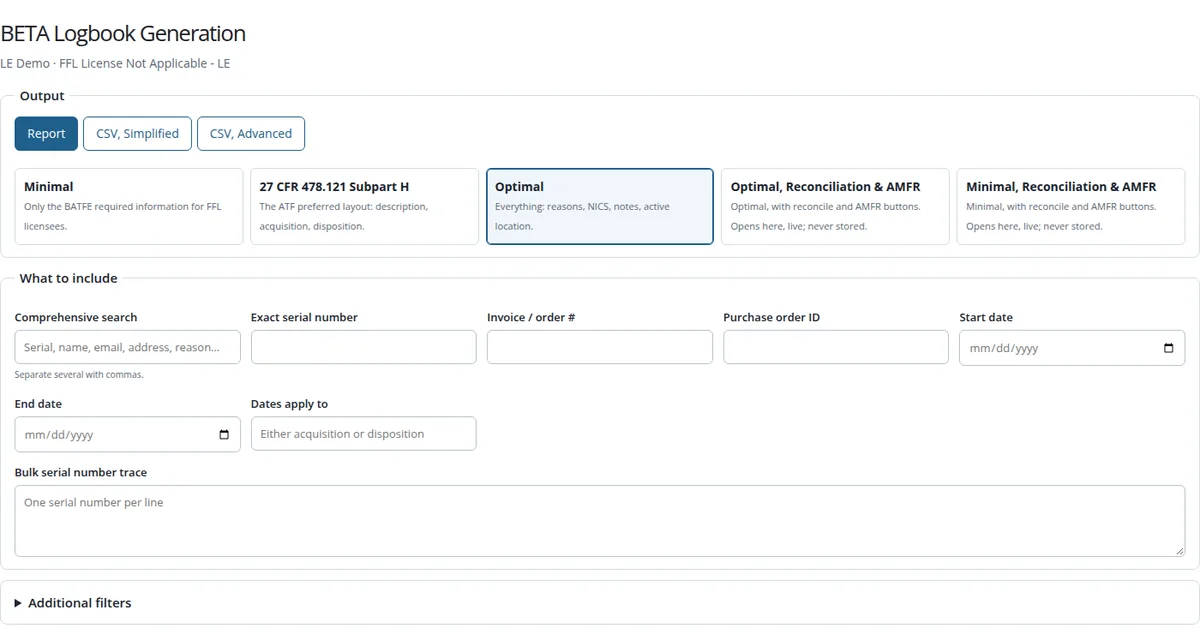
The Layout You Need
- Five layouts. Minimal, with only what ATF requires of FFL licensees; 27 CFR 478.121 Subpart H, ATF’s preferred layout; Optimal, which adds reasons, NICS, notes and active location; and Optimal or Minimal with Reconciliation & AMFR.
- Report or spreadsheet. An on-screen report, or a simplified or advanced CSV.
- Narrow it any way. One search box covers serial, name, email, address, reason, product name, part number, description and job number, with several terms separated by commas. Add an exact serial, invoice or purchase order number, start and end dates for acquisitions, dispositions or either, and filters for manufacturer, model, type, caliber, reason and state that narrow as you type.
- Bulk serial trace. Paste a list of serial numbers, one per line, and get their complete history in one report.
- Advanced settings for premises status (full chain of custody, on premises or assigned to employees), ownership, sort order, badge, and revision history that shows each correction and what it replaced.
- Error scanner. Find entries with no address or FFL, employee entries with no address, or entries not yet reconciled, before an inspector does.
Large Books, Handled
- Sized first. The page checks how large a request is before building it. Up to 5,000 entries are built right away.
- Bigger ones arrive by email. Larger requests go to a background queue and you get an email, “Your logbook is ready,” with a link that works for you, signed in, for 24 hours. A job that stops is retried on its own.
- Your recent reports from the last 14 days are listed on the page, and every finished file is also kept in the Document Report, as before.
- Read it anywhere. Reports open in the browser with their own search, paging and a Print button. The saved report works offline, and the page fits a phone.
Reconcile on the Page
The Reconciliation & AMFR layouts open live on the page, 50 entries at a time, and are never stored or emailed. Reconcile an entry, record an AMFR, export AMFRs, or undo either one. Every action records who did it, and its date comes from the ledger, not from someone’s computer clock.
Who Can Use It
Master, compliance and armorer users. Where an administrator has limited a user to certain asset types, the page shows and builds only those types. Open BETA Logbook Generation from the Master or Compliance home page, or choose Try BETA Logbook Generation on the existing logbook page.
Questions or ideas? Email help@apb360.com or call 251-677-7978.